I shipped MarkPad 0.11.0 on 11 August, and the headline is that YAML is now a document language in its own right, next to Markdown and JSON. That was the gap I kept hitting in my own use. MarkPad handled my notes fine, and then I would open a workflow file and go somewhere else.
What MarkPad is
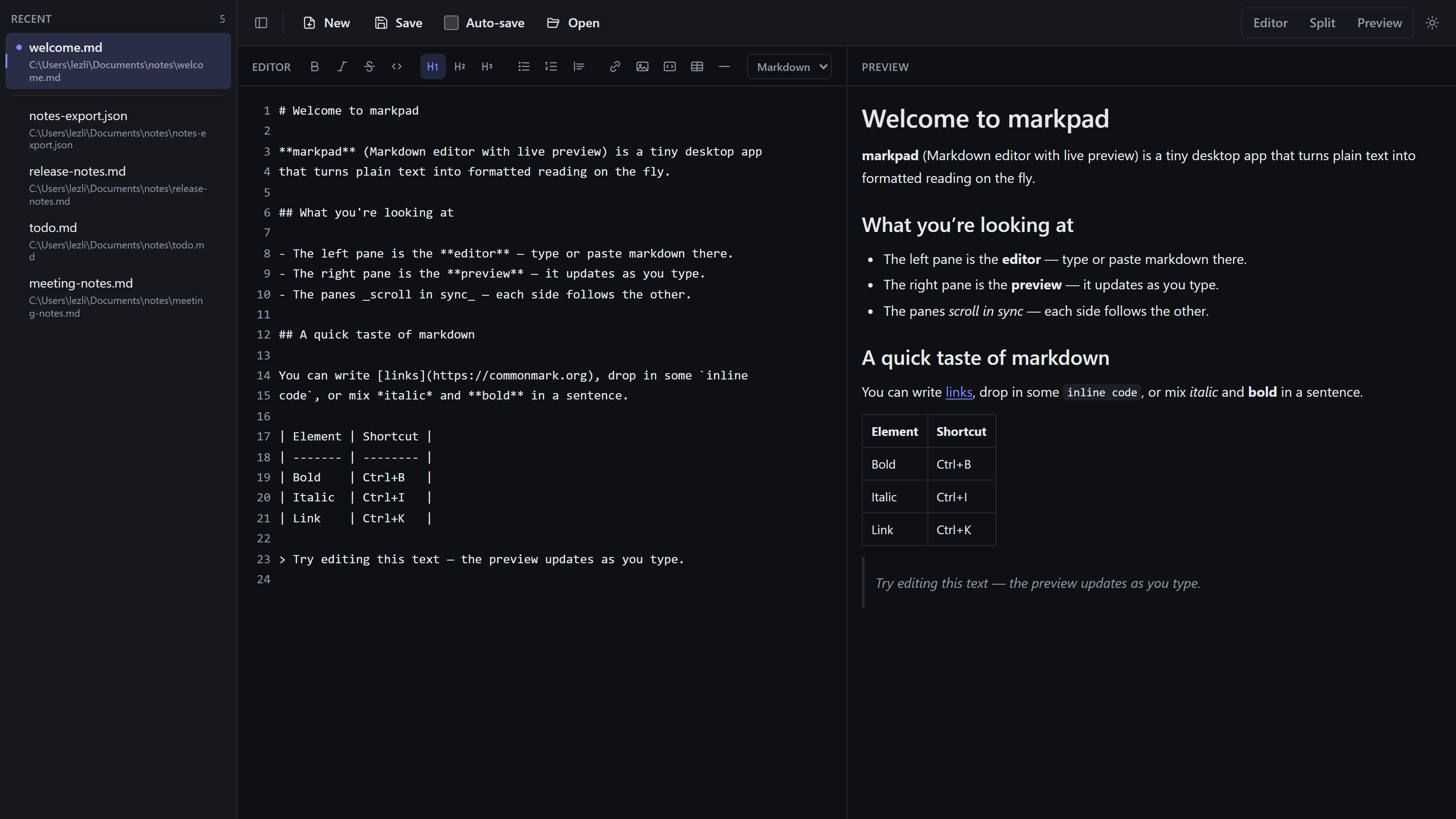
Most Markdown editors ask you to accept one of three compromises: an Electron app that ships an entire browser engine to render a text file, a web app that would like your documents in its cloud, or a bare text editor with no live preview at all. MarkPad is the small local option. Edit on the left, rendered preview on the right, and the files stay on your machine.
It is a native desktop app built on Tauri 2, so the shell is Rust and the rendering happens in the system webview instead of a bundled Chromium. The UI is React 19 and TypeScript on Vite, the editor is CodeMirror 6, Markdown goes through markdown-it 15 with markdown-it-anchor for heading ids, and the styling is Tailwind CSS 4. It runs on Windows, Linux, and macOS, it is MIT licensed, and it lives on GitHub.
Local-first is the part I will not trade away. Your content makes no network calls. Preferences sit in local storage, and session state (the recents list, the active document, unsaved drafts) sits in the platform’s standard application-data directory, so the app comes back up exactly where you left it without a server anywhere knowing that you opened a file.
The road to 0.11.0
MarkPad started as a split pane and very little else. 0.2.0 (20 May) was that foundation. The next three shipped inside ten days: 0.3.0 (21 May) added the parts that make it an editor rather than a demo, with save-file controls, multi-file tabs, and keyboard shortcuts; 0.4.0 (22 May) taught the operating system about it through file association and single-instance handling, plus a round of fixes to file saving and file paths; 0.5.0 (29 May) brought the Markdown formatting command engine, a format API with its own shortcuts, and the formatting toolbar sitting on top of it.
Then it went quiet for five weeks. 0.6.0 (3 July) was the redesign: the recent-files sidebar arrived, the look went flat and professional, the toolbar started reflecting the formatting under the cursor, and the preview learned to scroll to anchors. 0.7.0 (4 July) put each recent file’s absolute path under its name, clamped to two lines. 0.7.1 (7 July) was a small fix with an outsized effect, enabling raw HTML so in-document table-of-contents links actually jump.
0.8.0 (21 July) is where MarkPad stopped being only a Markdown editor. JSON became a second document language: highlighting, formatting, validation, folding, its own toolbar, a language toggle in the pane header, an editor-only JSON view, .json dialog filters and file association, and language persistence between sessions. It also carried a round of fixes that came out of an adversarial review of the JSON work.
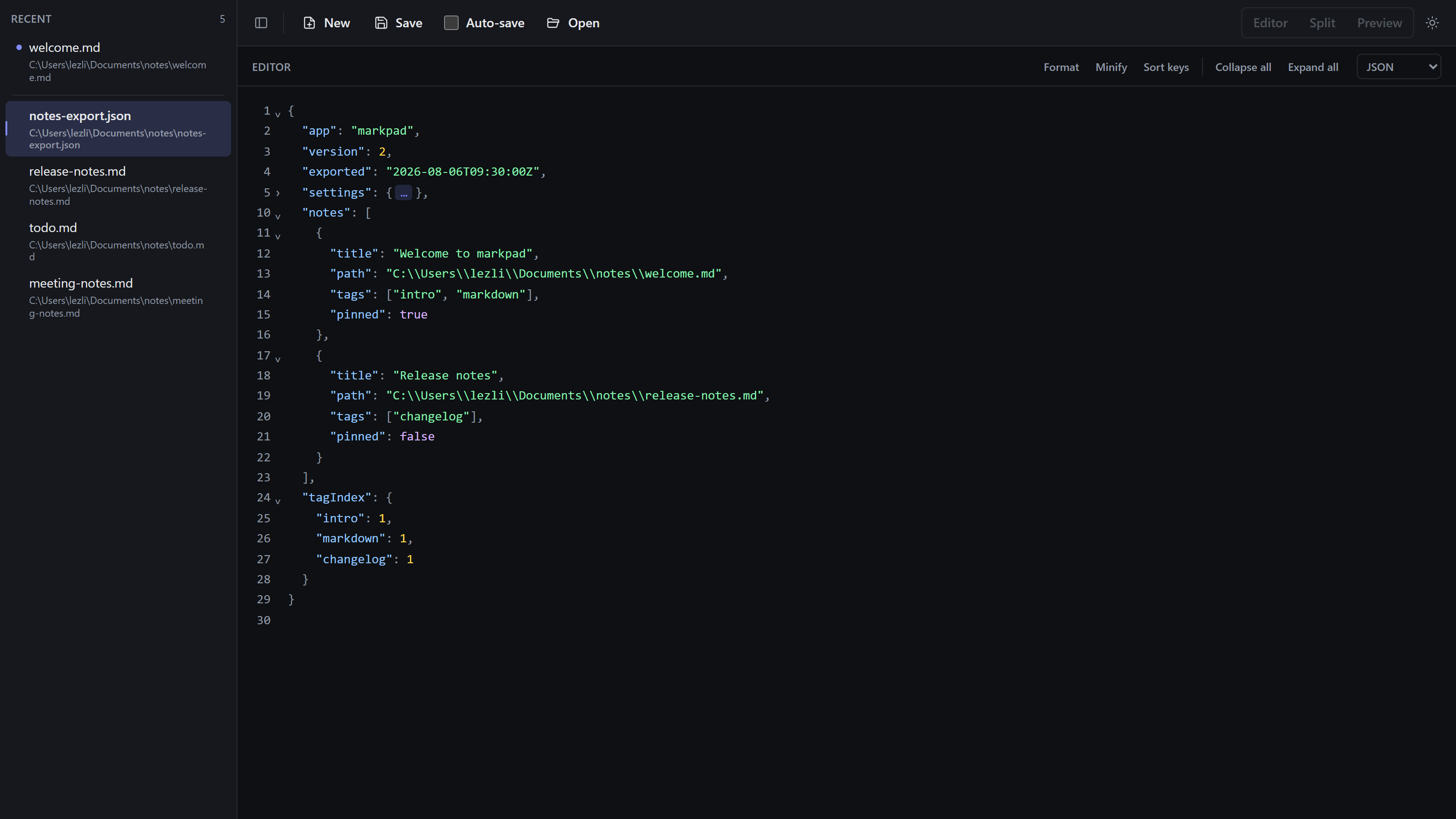
0.9.0 (3 August) followed with JSON typing comforts and a fix to theme the language toggle’s drop-down list. 0.10.0 (5 August) was a spread of quality work: split-view scroll sync, bulk-close actions in the recents context menu, JSON quoting a bare value the moment it stops being a number, and line numbers for Markdown too, plus a fix to keep linkifying scheme-less hosts under markdown-it 15.
Which brings 0.11.0 (11 August): YAML as a third document language (#106), diagrams from fenced code blocks (#103), outside-edit detection with a reload offer (#108), and one bug fix, the disabled view-mode tooltip now mentioning YAML as well.
The shape of that history is worth a note. Four releases in ten days in May, a gap, then the tool turned into a multi-language editor across July and August. And 0.8.0 to 0.9.0, a language landing and then its typing comforts a release later, is the exact same two-step YAML just walked in one release instead of two. Every meaningful feature starts as a short spec under specs/, PR titles are Conventional Commits, and release-please cuts the versions, which is why that changelog reads the way it does. Tests run on Vitest, lint on ESLint, and the Rust side is gated on cargo fmt --all --check plus a clippy run over all targets with -D warnings.
YAML, the third language
Open a .yaml or .yml file, a workflow, a compose file, a Kubernetes manifest, and MarkPad treats it as YAML. Or switch any buffer with the language toggle in the pane header. What you get is syntax highlighting, line numbers, live validation, and collapse or expand for mappings, sequences, and block literals. The validation surfaces the parser’s own message rather than something I rephrased, because the parser knows precisely what it choked on and I do not want that getting vaguer on the way to the screen.
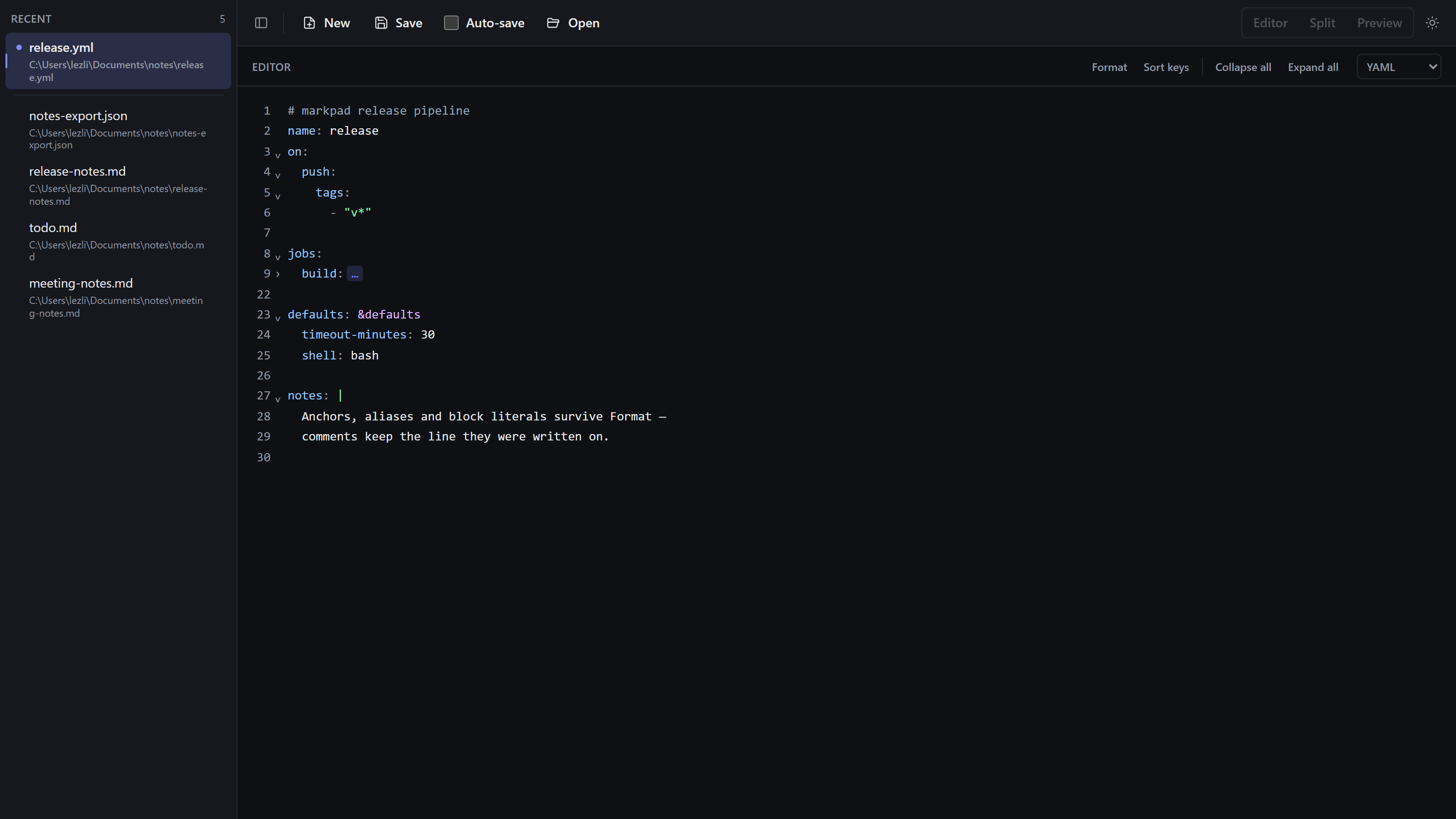
Two one-click actions sit in that pane header: Format, which reindents to two spaces and is bound to Shift+Alt+F, and Sort keys. The hard part is not reading YAML. It is writing it back out.
Both rewrite actions go through a real YAML document model, from eemeli’s yaml at ^2.9.0. That is the whole difference between an editor you hand a config file to and one you do not. Parse YAML into plain objects, re-emit it, and every comment is gone, along with the anchors, the aliases, the tags, and the distinction between a literal block scalar and a folded one. Take a file like this:
# build defaults, keep in sync with the release workflow
defaults: &defaults
  runner: ubuntu-latest
  timeout: 15

build: *defaults

release:
  runner: ubuntu-latest
  script: |
    npm ci
    npm run build
Run Format on it, then Sort keys, and the comment, the &defaults anchor, the *defaults alias, and the block scalar all come back out intact. Multi-document files split on --- survive the trip too.
A config file that comes back from your editor without its comments is a file you stop opening in that editor.
Like JSON, YAML documents are editor-only. There is nothing useful to preview in a compose file, so the Markdown preview and the format toolbar step aside while one is active and the view-mode switcher is disabled. Its tooltip explaining why now says YAML as well, which was the single bug fix in this release.
Typing comforts
Enter carries the shape of the line above it. A - item opens the next item at the same indent. An item left empty ends the list and steps back out to the level the sequence hangs off. A key with no value yet opens its block one level in. Brackets and quotes pair the way they do in JSON, and JSON pasted into an empty YAML buffer lands as YAML.
The small one I like most: typing : after a bare key inserts the space YAML requires. key:value is a single scalar string and not a mapping at all, which is a trap that has cost me real time in a file that looked completely fine.
Every automatic insertion undoes on its own with Ctrl+Z. Nothing the editor typed for you is welded to something you typed, and that is what makes this kind of help tolerable instead of a fight.
Diagrams and outside edits
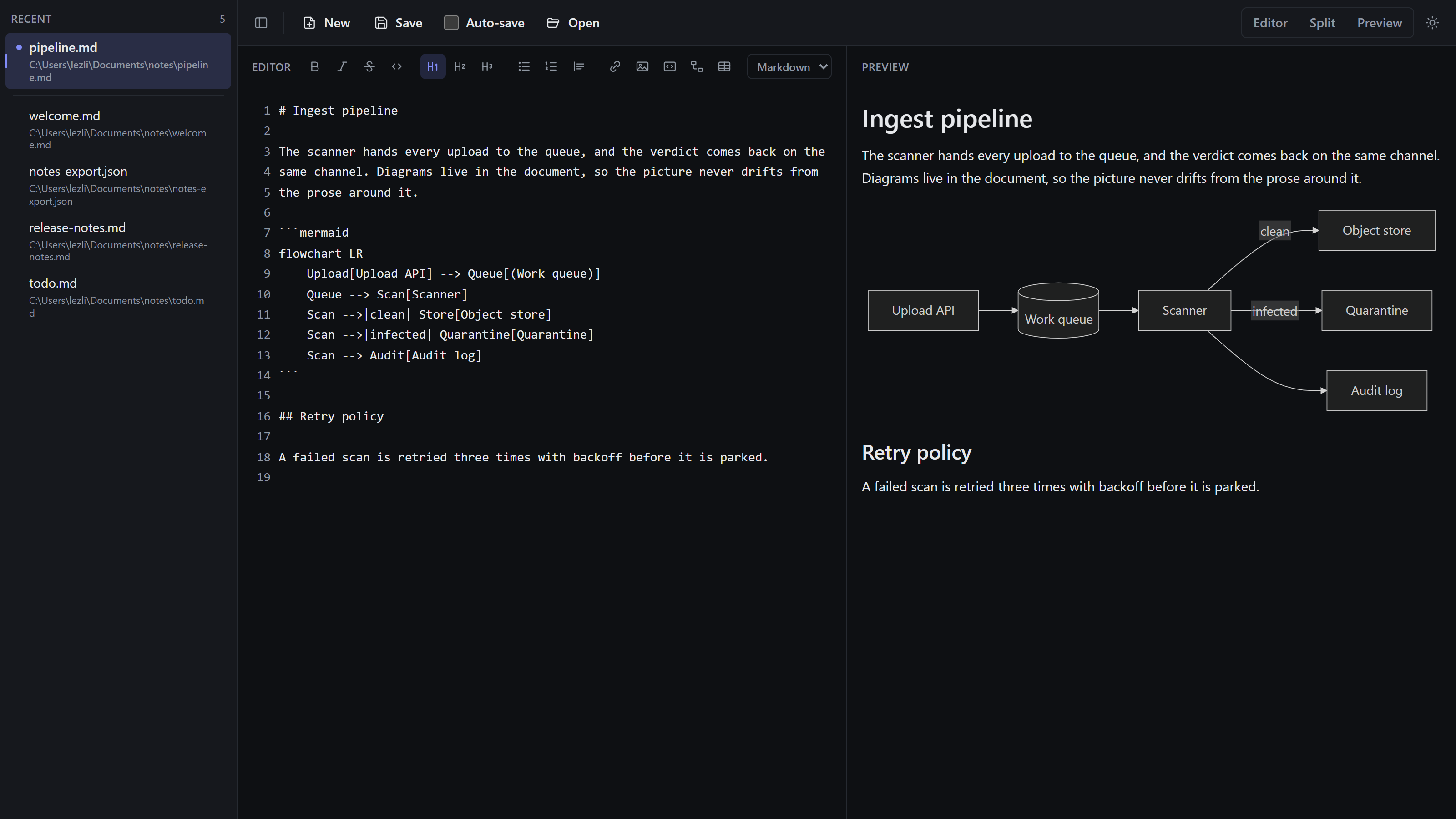
The other two features in 0.11.0 are smaller. A code fence tagged mermaid now renders in the preview, drawn by Mermaid 11: flowcharts, sequence, class, state, ER, gantt, pie, mindmap, timeline, git graphs, and the rest of its catalogue. A fence tagged dot (or graphviz, or gv) renders Graphviz DOT through @viz-js/viz, which is Graphviz itself compiled to WebAssembly and running in the app. Both engines follow the light or dark theme, and both run entirely locally, which matters when the diagram describes an internal system.
Source that does not parse shows the engine’s own message inline with the block, so a half-typed diagram never blanks the preview while you are still writing it. Rendered SVG goes through DOMPurify like the rest of the preview, because it came out of the same untrusted document.
Outside-edit detection is the one I use constantly. Change an open file in another program, come back to the MarkPad window, and it tells you, offering Reload from disk or Keep my version. Other open files that changed are marked in the recents list. A file merely touched, or saved with identical content, says nothing at all. Auto-save pauses until you answer, so it can never overwrite the other program’s work behind your back. And a file deleted out from under you says exactly that instead of offering a reload: your copy stays open, and saving writes the file again.
Getting it, and what it costs
Downloads are on the releases page: a Windows setup .exe and .msi, a .deb, .rpm, and .AppImage for Linux, and a .dmg for macOS.
Here is the honest part. Lightweight and renders Mermaid diagrams pull in opposite directions, and this is the release where that showed up in the numbers. The Windows setup went from 2,654,224 bytes in 0.10.0 to 4,003,094 bytes in 0.11.0, roughly 2.5 MiB to 3.8 MiB, a fifty percent jump in one version. The YAML work is small. The weight is the two diagram engines landing in the same release. What keeps that honest at runtime is that both are lazy-loaded: neither is loaded until a document actually contains a diagram, so opening a note or a manifest costs nothing extra. The installer carries them regardless, and I would rather write that down than round it off. For the rest of 0.11.0, the .msi is 5,165,056 bytes, the .deb 6,713,734, the .rpm 6,714,422, and the .dmg 10,284,601. The .AppImage is the outlier at 84,036,088, because an AppImage bundles its own runtime by design.
So the accounting, plainly: a Markdown, JSON, and YAML editor that keeps your files local and makes no attempt to be an IDE, in a Windows installer still under 4 MB. It is 0.11.0 of an early-development tool and I mean both halves of that. Things will move, and there are features I want that are not in it yet. But it is what I write with every day.
It is MIT licensed and open, so issues and pull requests are welcome on GitHub. The rest of what I ship is at lezli01.is-a.dev.



// comments load as you scroll here. They live in GitHub Discussions; sign in with GitHub to join in.